Caffeine tracking · iPhone
Caffeine Tracker for iPhone That Reads Your Sleep Back
Most caffeine trackers stop at the curve. Circa draws the curve, then checks it against the deep sleep your tracker actually measured and tells you the size of the effect in your own nights.

Free · no account · ad supported
Logging
Two taps, exact numbers
A tracker is only as good as the log behind it, so Circa asks for the things that matter and nothing else.
- Exact dose, exact unit, exact time. Type any amount. Switch between mg, g, µg, IU, ml, drops and pouches freely. A stack is a shortcut, never a constraint.
- One tap from the Home Screen or Lock Screen. The widget carries your three most frequent intakes and logs straight from the lock screen.
- Or just say it. "Log an espresso in Circa" works through Siri and Shortcuts.
- Backfill without lying to yourself. Late entries are marked as backfill in the log and in the export, so the completeness figure stays honest.
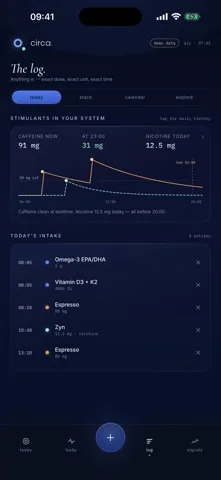
The curve
What the decay curve is, and what it is not
Circa models caffeine and nicotine clearance from what you logged and plots the result against your bedtime. Two numbers sit above it at all times: how much is in your system now, and how much is projected to remain when you go to bed. A horizontal line at 50 mg gives you a fixed reference so one day is comparable with the next.
It is a model, not a measurement. Nobody's phone can read caffeine out of their blood, and clearance rates differ a lot between people. What the app can do honestly is measure the association in your own data, which is what the Signals tab is for. See how late you can drink coffee for the arithmetic behind the tail.
Circa is a personal tracking tool, not a medical device. It does not diagnose, treat, or prevent any condition, and it gives no medical advice. Its numbers describe your own logs and your own tracker readings, nothing more. Talk to a qualified professional before you change medication, supplementation, or anything else about your health.
The measurement
Caffeine at bedtime against measured deep sleep
Once you have enough complete nights, Circa fits your caffeine at bedtime against the deep-sleep minutes your tracker recorded, controlling for training load, weekday, alcohol and bedtime. The result is stated as minutes of deep sleep per 100 mg, with n, a 95 percent confidence interval and a p-value, and you can open the scatter plot of the actual nights behind it.
A null result stays visible as a null result. An app that only ever shows you effects is telling you something about its filter, not about your body.
Honesty
What Circa does not have
If one of these is what you came for, another app will serve you better and it is quicker to say so here.
- No branded-drink database. There is no catalogue of thousands of chain-store drinks. You type the milligrams, or save your own item once and reuse it.
- No barcode scanner and no camera.
- No reminders or notifications of any kind.
- No Apple Watch app and no Apple HealthKit integration.
- No iCloud sync. Your data lives on the one iPhone that holds it, plus whatever you export.
For the trade-off spelled out against a specific competitor, see the HiCoffee alternative page.
Read on